
363,000 false 429s in a day: the rate limit bug that Gutenberg revealed
Published on April 7, 2026
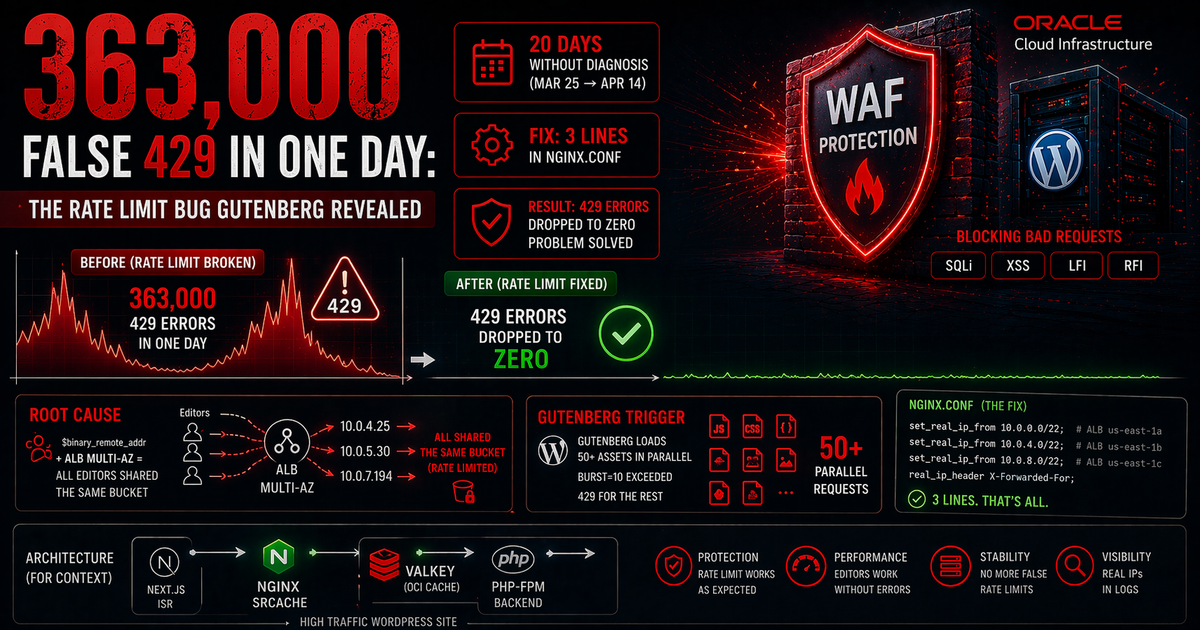
The problem: 363,000 false 429 errors in a single day
A high-traffic WordPress site started returning 429 (Too Many Requests) errors to legitimate users intermittently. Rate limiting had been configured with limit_req_zone using $binary_remote_addr — which seemed correct. But blocks were happening in bulk, with no real abuse pattern. Over 20 days of investigation, there were 905,311 cumulative errors. The peak: 363,000 in a single day.
The Gutenberg editor was the visible trigger. Opening a post for editing fires more than 50 parallel asset requests (JS, CSS, fonts). With burst=10 configured, any logged-in editor would instantly exceed the rate limit — but the problem wasn't the burst.
Root cause: $binary_remote_addr and the multi-AZ ALB
In production behind an AWS Application Load Balancer, nginx doesn't see the real client IP — it sees the IP of the ALB node that forwarded the request. An ALB in multi-AZ configuration runs one node per subnet per Availability Zone. All clients were arriving through a small number of ALB node IPs.
The practical effect: with $binary_remote_addr pointing to the ALB IP, rate limiting counted requests from all users as if they came from a single client. With any moderate traffic, the shared bucket would overflow and return 429 to everyone.
nginx's real_ip_module solves this — it reads the real client IP from the X-Forwarded-For header, but requires trusted IPs (the ALB nodes) to be explicitly declared with set_real_ip_from. The error was declaring only the first AZ's subnet, ignoring the subnets of the other AZs.
Configuration before the fix
# nginx.conf — incomplete configuration (only 1 AZ declared)
limit_req_zone $binary_remote_addr zone=wp_limit:10m rate=10r/s;

# Only 1 subnet declared
set_real_ip_from 10.0.0.0/22;   # ALB us-east-1a
real_ip_header X-Forwarded-For;
With only one subnet declared, requests routed through ALB nodes in the other AZs (10.0.4.0/22 and 10.0.8.0/22) didn't go through real_ip_recursive — nginx kept the ALB node IP as the source address.
The fix: 3 lines in nginx.conf
# nginx.conf — correct configuration (all AZs declared)
limit_req_zone $binary_remote_addr zone=wp_limit:10m rate=10r/s;

set_real_ip_from 10.0.0.0/22;   # ALB us-east-1a
set_real_ip_from 10.0.4.0/22;   # ALB us-east-1b ← added
set_real_ip_from 10.0.8.0/22;   # ALB us-east-1c ← added
real_ip_header X-Forwarded-For;
real_ip_recursive on;
real_ip_recursive on is essential when there are multiple chained proxies. With it, nginx walks the entire X-Forwarded-For chain from right to left and discards IPs that are in the trusted list, arriving at the real client IP.
Why Gutenberg was the visible trigger
The WordPress block editor loads more than 50 JavaScript and CSS assets in parallel when opening any post for editing. With burst=10 configured, that initial burst already exceeded the limit — but with the ALB IP instead of the real IP, the problem was exponentially worse: all editors in the WordPress cluster were sharing the same rate limit bucket.
The symptom was consistent: immediate 429 on opening the editor, sporadic recovery on reload, blocks returning. Users in heavy editing sessions reported intermittent errors with no clear pattern — exactly the behavior expected from a shared bucket being collectively exhausted.
For 20 days, the DDoS attack hypothesis was investigated and ruled out. Logs showed 'attacking' IPs that were, in fact, the ALB's own nodes. The problem was never traffic volume — it was misconfigured proxy trust.
Diagnosis: how to identify the problem
To check which IP nginx is receiving as the source address:
# Add a temporary log to inspect the source IP
log_format debug_ip '$remote_addr - $http_x_forwarded_for - $request';
access_log /var/log/nginx/debug_ip.log debug_ip;
If $remote_addr shows private range IPs (10.x.x.x, 172.x.x.x) while $http_x_forwarded_for contains real client IPs, the real_ip_module isn't resolving correctly. The reason: ALB subnets not declared in set_real_ip_from.
To list active ALB node IPs:
# Via AWS CLI — list ALB node IPs by AZ
aws elbv2 describe-load-balancers --names my-alb-name \
  --query 'LoadBalancers[0].AvailabilityZones[*].{AZ:ZoneName,SubnetId:SubnetId}'

# Or via dig, resolving the ALB DNS name
dig +short my-alb-name.us-east-1.elb.amazonaws.com
Important: use subnets (CIDRs) in set_real_ip_from, not individual node IPs. ALB node IPs change with every redeploy, node replacement, or scaling event. Subnet CIDRs are stable.
Lessons learned
1. Always use $http_x_forwarded_for when diagnosing rate limiting behind a proxy.
2. set_real_ip_from must cover all subnets of all ALB AZs — not just the primary AZ.
3. Include real_ip_recursive on when there are multiple proxies (ALB → nginx, for example).
4. Before investigating DDoS or abuse, verify whether the IPs in logs are actually external client IPs or internal proxy IPs.
5. Gutenberg as a trigger is predictable: parallel loading of 50+ assets will exceed any conservative burst. Rate limit exceptions for /wp-admin and /wp-json should be considered.
Result
After adding the 3 lines (the two missing subnets and real_ip_recursive on), 429 errors dropped to zero immediately. After 20 days of investigation and 905,311 cumulative errors, the fix took less than 5 minutes to apply and didn't require an nginx restart — only a reload.
The fastest fix is usually the last one tested. In this case, focusing on traffic analysis and burst adjustments delayed investigating the proxy configuration. The premise 'rate limiting is configured correctly' was wrong from the start.