
ARM64 Build: 40 min → 8-12 min — eliminating QEMU in GitHub Actions
Published on April 14, 2026
The problem: silent QEMU on the x86 runner
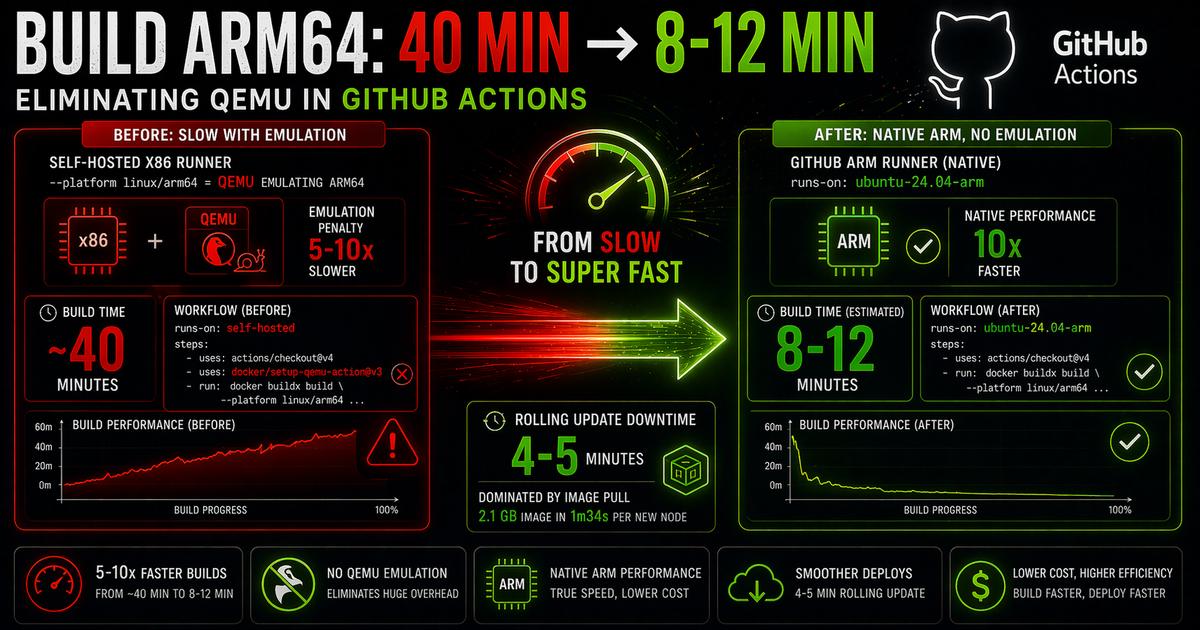
A GitHub Actions CI/CD pipeline was building a Docker image for an OKE (Oracle Kubernetes Engine) cluster with ARM64 nodes (OCI A1.Flex Ampere instances). The configured runner was self-hosted on an x86 machine. The Dockerfile was standard, buildx was correctly set up — and the build took ~40 minutes.
The cause wasn't in the Dockerfile or the application size (Next.js with 350 generated pages). It was in one line of the workflow:
- uses: docker/setup-qemu-action@v3
- run: docker buildx build --platform linux/arm64 .
When an x86 runner encounters --platform linux/arm64, Docker uses QEMU to emulate the ARM64 architecture on x86 hardware. The emulation penalty is 5-10x in compilation time — every ARM64 instruction is translated in real time by the emulator.
setup-qemu-action doesn't warn that the build will be slow. It simply enables emulation and buildx proceeds. The result is a functionally correct build, but orders of magnitude slower than it would be on native hardware.
Context: AWS (x86) → OCI ARM64 migration
The project had migrated from AWS ECS (x86 instances) to OKE with A1.Flex nodes (ARM64 Ampere) for cost reduction. The production image running on ECS was amd64 — the first ARM64 build was done manually with Docker buildx on an Apple Silicon Mac (which is native ARM). For automated CI/CD, the existing self-hosted x86 runner was reused with QEMU to avoid setting up new infrastructure.
For weeks, production deploys took ~40 minutes just in the build step. The rest of the pipeline (push to OCIR, kubectl rollout) took seconds.
The solution: ubuntu-24.04-arm in GitHub Actions
GitHub has offered managed ARM64 runners since 2024. The ubuntu-24.04-arm runner runs on real ARM hardware — no emulation, no QEMU, no instruction translation penalty.
The workflow was split into two independent jobs:
# Before — single x86 job with QEMU for both prod and stage
jobs:
  Build-and-Deploy:
    runs-on: self-hosted          # x86
    steps:
      - uses: actions/checkout@v4
      - uses: docker/setup-qemu-action@v3   # ARM64 emulation
      - uses: docker/setup-buildx-action@v3
      - run: |
          docker buildx build \
            --platform linux/arm64 \        # forces ARM64 via QEMU
            --push \
-t $IMAGE_TAG .# After — separate jobs per branch/environment
jobs:
Build-and-Deploy-Stage:
runs-on: self-hosted # x86 — stage uses amd64, no problem
if: github.ref == 'refs/heads/staging'
steps:
- uses: actions/checkout@v4
- uses: docker/setup-buildx-action@v3
- run: docker buildx build --push -t $IMAGE_TAG .
Build-and-Deploy-Prod:
runs-on: ubuntu-24.04-arm # native ARM — no QEMU
if: github.ref == 'refs/heads/master'
steps:
- uses: actions/checkout@v4
- uses: docker/setup-buildx-action@v3
- run: |
docker buildx build \
--push \ # no --platform: runner is already ARM64
-t $IMAGE_TAG .The critical point: in the prod job, --platform linux/arm64 was removed. When the runner is already ARM64, specifying the platform is redundant — and keeping it can confuse buildx in some versions. The build becomes native without any other changes.
What was removed from the prod job
docker/setup-qemu-action@v3 — unnecessary: runner is already ARM64
--platform linux/arm64 — unnecessary: runner's native architecture
Set deploy Key — unused: deploy via kubectl, not SSH
Load Centralized Configuration — variables migrated to GitHub repository secrets/vars
Side fix: kubectl rollout status RBAC
After the build, the pipeline runs kubectl rollout status to wait for the deploy to complete before marking the job as success. The command was silently failing with a permission error — the CI ServiceAccount had only get, patch, and update on deployments.
# Error when running kubectl rollout status
Error from server (Forbidden): deployments.apps "nextjs" is forbidden:
User "system:serviceaccount:myapp:cicd-deployer" cannot list resource
"deployments" in API group "apps" in the namespace "myapp"
rollout status needs list and watch to observe rolling update progress. The Role was updated:
apiVersion: rbac.authorization.k8s.io/v1
kind: Role
metadata:
  name: cicd-deployer-role
  namespace: myapp
rules:
- apiGroups: ["apps"]
  resources: ["deployments"]
  verbs: ["get", "list", "watch", "patch", "update"]
- apiGroups: ["apps"]
  resources: ["replicasets"]
  verbs: ["get", "list"]
The second bottleneck: 2.1 GB image
With the build solved, the next bottleneck became visible: downtime during rolling updates was 4-5 minutes — not because of Kubernetes slowness, but because of image pull time. Each new OKE node needed to download 2.1 GB from OCIR (Oracle Container Registry), which took 1 minute and 34 seconds per pod. With 2 replicas and sequential rolling update, the partial unavailability window was consistent.
Image size reduction is the next step: multi-stage build to exclude dev node_modules, Next.js output: 'standalone' (drastically reduces what goes into the final image) and layer optimization. A ~500 MB image would reduce the pull from 1m34s to ~20s — eliminating practically all rolling update downtime.
Result
The first deploy after switching to ubuntu-24.04-arm confirmed it worked: successful build, image published to OCIR, pods starting in OKE with the new tag.
# Post-deploy validation
kubectl get pods -n myapp
# nextjs-7f4cbbdffd-g595h   1/1   Running   0   6m
# nextjs-7f4cbbdffd-gt5jt   1/1   Running   0   5m

kubectl get deployment nextjs -n myapp \
  -o jsonpath='{.spec.template.spec.containers[0].image}'
# registry.example.com/myapp/www:abc1234f
QEMU is a valid tool for one-off builds on development machines. For production CI/CD where every commit goes through the pipeline, the 5-10x penalty is unacceptable. Native ARM runners exist in GitHub Actions and cost the same as equivalent x86 runners — there's no reason to keep QEMU in long-running pipelines.
Checklist to migrate your pipeline
1. Identify if the build uses --platform with a different architecture than the runner
2. Check if setup-qemu-action is present (clear sign of emulation)
3. Switch runs-on to ubuntu-24.04-arm (or an ARM self-hosted runner)
4. Remove setup-qemu-action and --platform from the prod job
5. Check ServiceAccount RBAC: rollout status needs list + watch
6. Measure image pull time — above 30s is a candidate for optimization