
Fluentd DaemonSet on OKE ARM64: 8 sequential errors until logs reached OCI Logging
Published on April 17, 2026
The goal: Next.js pods → OCI Logging Service
An OKE (Oracle Kubernetes Engine) cluster with ARM64 nodes (A1.Flex Ampere) needed to send application pod error logs to the OCI Logging Service. The application already emitted structured logs via stdout/stderr — the work was to capture those logs with Fluentd, filter by the correct pods, and ingest into OCI Logging via HTTPS authenticated by instance principal.
The planned architecture was straightforward:
Pod (console.error → stdout/stderr)
  → CRI-O (writes to /var/log/containers/*.log)
    → Fluentd DaemonSet (tail + filter + match)
      → OCI Logging Service (via HTTPS, auth: instance principal)
What wasn't in the plan were the 8 errors between kubectl apply and the first confirmed log in OCI Logging.
Error 1: OCI Container Registry image requires authentication
The official OCI Logging documentation suggested using Oracle's own Container Registry image:
container-registry.oracle.com/oci_logging/fluentbitWhen attempting to pull this image on OKE nodes, kubelet returned an authentication error. The Oracle Container Registry requires login even for public images — and configuring ImagePullSecrets for an external registry across all cluster nodes wasn't the right path.
Fix: use the official Fluent Bit image from public Docker Hub, which requires no authentication:
docker.io/fluent/fluent-bit:3.2Error 2: CRI-O rejects short image names
Even with the image switched to fluent/fluent-bit:3.2, kubelet rejected it with:
short name mode is enforcing, but image name "fluent/fluent-bit:3.2"
returns ambiguous list of candidates
Oracle Linux 8.10 running on OKE nodes has CRI-O configured in short name enforcing mode — all image names must be fully qualified with the explicit registry.
Fix: prefix with docker.io/ on all image names in the manifest:
image: docker.io/fluent/fluent-bit:3.2Error 3: Fluent Bit 3.2 has no oci_logging plugin
With the pod starting up, logs showed that Fluent Bit couldn't load the output plugin needed to send to OCI Logging Service. The oci_logging plugin doesn't exist in Fluent Bit — it only exists in the Fluentd Ruby gem.
Fix: migrate from Fluent Bit to Fluentd with the fluent-plugin-oci-logging gem. This required building a custom image based on official Fluentd:
FROM docker.io/fluent/fluentd:v1.17-debian-1
# gems installed in the following steps...
Error 4: build failed — no toolchain in base image
The Fluentd base image (debian) doesn't include a C compiler. Installing the fluent-plugin-oci-logging gem failed during native extension compilation:
make: g++: No such file or directory
make[1]: *** [Makefile:234: <target>.o] Error 127
Fix: add build-essential to the Dockerfile before gem installation:
FROM docker.io/fluent/fluentd:v1.17-debian-1

USER root
RUN apt-get update && apt-get install -y build-essential && rm -rf /var/lib/apt/lists/*
RUN gem install fluent-plugin-oci-logging                 fluent-plugin-kubernetes_metadata_filter                 fluent-plugin-parser-cri
Error 5: File.exists? removed in Ruby 3.2
With gems installed, the pod started but crashed immediately with:
NoMethodError: undefined method 'exists?' for File:Class
/usr/local/bundle/gems/fluent-plugin-oci-logging-1.0.12/lib/fluent/plugin/os.rb
The File.exists? method was removed in Ruby 3.2 (deprecated since Ruby 2.1). The fluent-plugin-oci-logging gem version 1.0.12 still used the old method and hadn't been updated.
Fix: inline patch in the Dockerfile via sed:
RUN sed -i 's/File\.exists?/File.exist?/g' /usr/local/bundle/gems/fluent-plugin-oci-logging-*/lib/fluent/plugin/os.rbCheck in future gem versions if File.exists? has been fixed upstream. The patch is needed as long as the gem isn't updated.
Error 6: Permission denied creating buffer directory
Pod starting, gems working — but Fluentd was hanging on initialization with:
Permission denied @ dir_s_mkdir - /var/log/fluentd-buffersThe DaemonSet was configured to run as the default Fluentd user (non-root). The /var/log directory on the host belongs to root and the fluent user had no write permission.
Fix: add securityContext: runAsUser: 0 to the DaemonSet and move the buffer to /tmp/fluentd-buffers/:
spec:
  template:
    spec:
      securityContext:
        runAsUser: 0
      containers:
        - name: fluentd
          # in fluent.conf:
          # <buffer>
          #   path /tmp/fluentd-buffers/
          # </buffer>
Note: log collection DaemonSets that need to read /var/log/containers/ from the host typically need to run as root. This is expected and documented for log collectors like Fluentd and Fluent Bit.
Error 7: 404 on ingestion — Dynamic Group with wrong OCID
With the pod running and no permission errors, ingestion attempts to OCI Logging were failing with:
NOT_AUTHORIZED_OR_NOT_FOUND (404) - Authorization failed or resource not foundFluentd was using instance principal authentication — OKE nodes need to be in a Dynamic Group with an OCI Logging access policy. The Dynamic Group had been created with this rule:
# Incorrect rule — uses tag that doesn't exist on OKE nodes
All {tag.Oracle-Tags.CreatedBy.value = '<cluster-ocid>'}
The problem: the Oracle-Tags.CreatedBy tag on OKE nodes contains the nodepool OCID, not the cluster OCID. Nodes from different clusters in the same compartment share the same cluster OCID — but nodepool OCIDs are unique. Using the wrong OCID caused the Dynamic Group to not recognize the nodes.
Fix — simplest and most robust option: use instance.compartment.id instead of tags:
# Correct rule — all nodes in the compartment
All {instance.compartment.id = '<compartment-ocid>'}
Using instance.compartment.id is simpler and more robust than depending on nodepool tags. If the cluster is recreated or the nodepool replaced, the rule remains valid. The tradeoff is granularity: all nodes in the compartment enter the group — evaluate whether this is acceptable in your environment.
Error 8: <auth> block in config breaks authentication
After fixing the Dynamic Group, ingestion logs showed warnings about the auth block in fluent.conf:
[warn]: #0 unknown parameter 'auth' in <match>The fluent-plugin-oci-logging plugin uses auto-detection of the authentication type — it automatically detects if it's running on an OCI instance and uses instance principal. Adding an explicit <auth> block is not only unnecessary but interferes with automatic authentication.
Fix: completely remove the <auth> block from fluent.conf. The plugin handles authentication automatically via instance principal.
<match kubernetes.**>
  @type oci_logging
  log_object_id <log-ocid>
  # <auth> — DO NOT add. Plugin uses auto-detection.
</match>
Result: DaemonSet Running, first log in 11 seconds
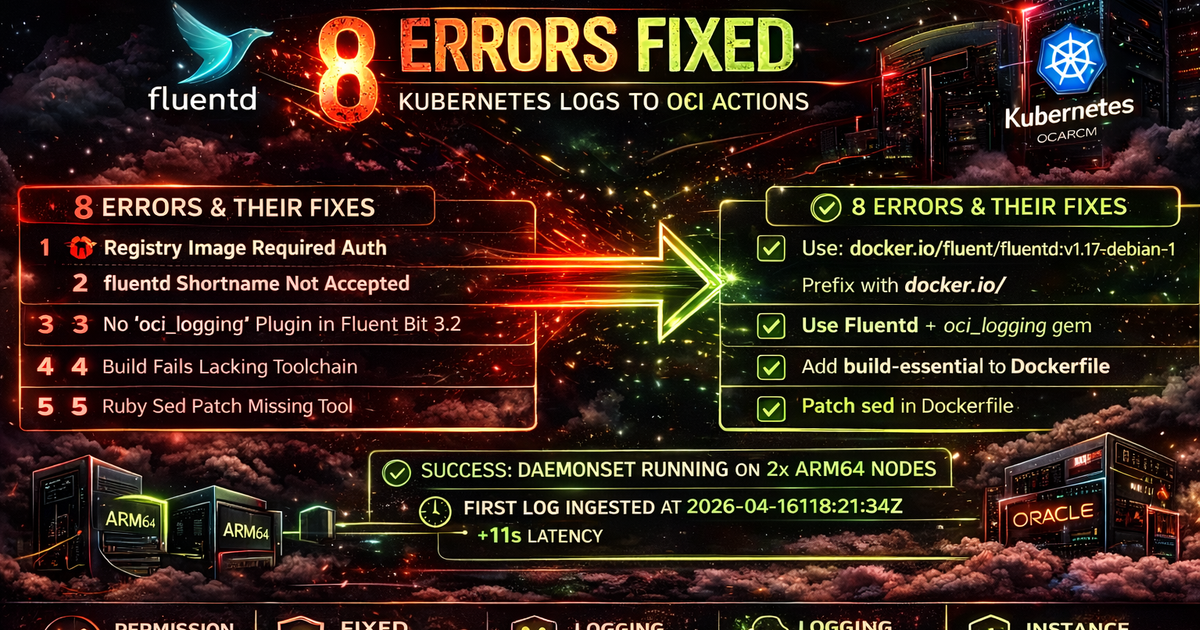
After resolving all 8 errors, the DaemonSet came up on both ARM64 nodes without restart:
kubectl get pods -n logging
# fluentd-a1b2c   1/1   Running   0   5m
# fluentd-d3e4f   1/1   Running   0   5m
The first confirmed log in OCI Logging arrived 11 seconds after the pod became Running — exactly the configured flush_interval of 10 seconds plus network latency.
# First ingested log:
{
  "timestamp": "2026-04-16T18:21:23Z",
  "message": "Error: Loading chunk failed.",
  "stream": "stderr"
}
# Ingested at: 2026-04-16T18:21:34Z  (+11s)
Summary of 8 errors and fixes
1. Registry requires auth → use docker.io/fluent/fluentd:v1.17-debian-1 (public Docker Hub)
2. CRI-O rejects short names → prefix all image names with docker.io/
3. Fluent Bit has no oci_logging → migrate to Fluentd + fluent-plugin-oci-logging gem
4. Build without toolchain → add build-essential to Dockerfile
5. File.exists? removed in Ruby 3.2 → sed patch in Dockerfile
6. Permission denied on buffer → runAsUser: 0 + buffer in /tmp/fluentd-buffers/
7. Dynamic Group with wrong OCID → use instance.compartment.id instead of cluster/nodepool tag
8. <auth> block interferes with authentication → remove — plugin uses instance principal auto-detection